On August 25, Anthropic connected Claude's memory to its desktop assistant Cowork: project context and Q3 goals accumulated in chat are picked up by Cowork when it takes on a task, and new information flows back the other way. All memory lives in Memory settings, with every entry readable, editable, and deletable. One briefing, both sides get it.
Cowork picks up chat memory
Cowork used to have no memory and had to be briefed from scratch every time; that changes as of August 25.
Cowork is Anthropic's desktop AI assistant(a Claude-based desktop agent capable of running long tasks in the cloud, organizing files, and generating documents), which previously had no memory and required a full briefing every time: who's the manager, where the project is stuck, how the team prefers things written. After the update, the Q3 priorities and project progress accumulated in chat are already known when a task lands on Cowork; new information Cowork generates also flows back to chat, with both sides sharing one context.
Three scenarios from the official source are very concrete. Ask Cowork to write an update for your manager, and it already knows who that is and how they like things written; brainstorm a conference's headcount, cities, and speakers with Claude in chat, and Cowork uses those details directly when drafting budget and logistics docs—no need to repeat yourself. Explain once in chat how your team defines metrics, and every quarterly review deck Cowork produces from then on follows that same definition.
No more waiting for the conversation to end—memory writes happen mid-chat
Old-school AI memory worked more like meeting minutes—key points extracted only after the conversation wrapped up. This time, Claude moves the beat forward to mid-conversation: toss off a casual remark, and a second later it may already be archived.
The bottleneck of traditional memory mechanisms is timing. Conversation summarization(AI automatically distills key points after an entire conversation ends) usually requires a session(a complete conversation) to wrap up before the model looks back over the full chat and extracts entries like "the user is a product manager" or "the company is doing a Q3 redesign." This post-session summarization carries a one-beat delay, and the model decides on its own what's worth remembering and what isn't.
Anthropic's move this time is to push the write point upstream to mid-conversation. Whenever a new memorable topic surfaces in a chat—such as "the project deadline has moved to September"—Claude appends that entry directly to the memory pool. You don't need to say "remember this"; the next time you start a chat, it already knows by default.
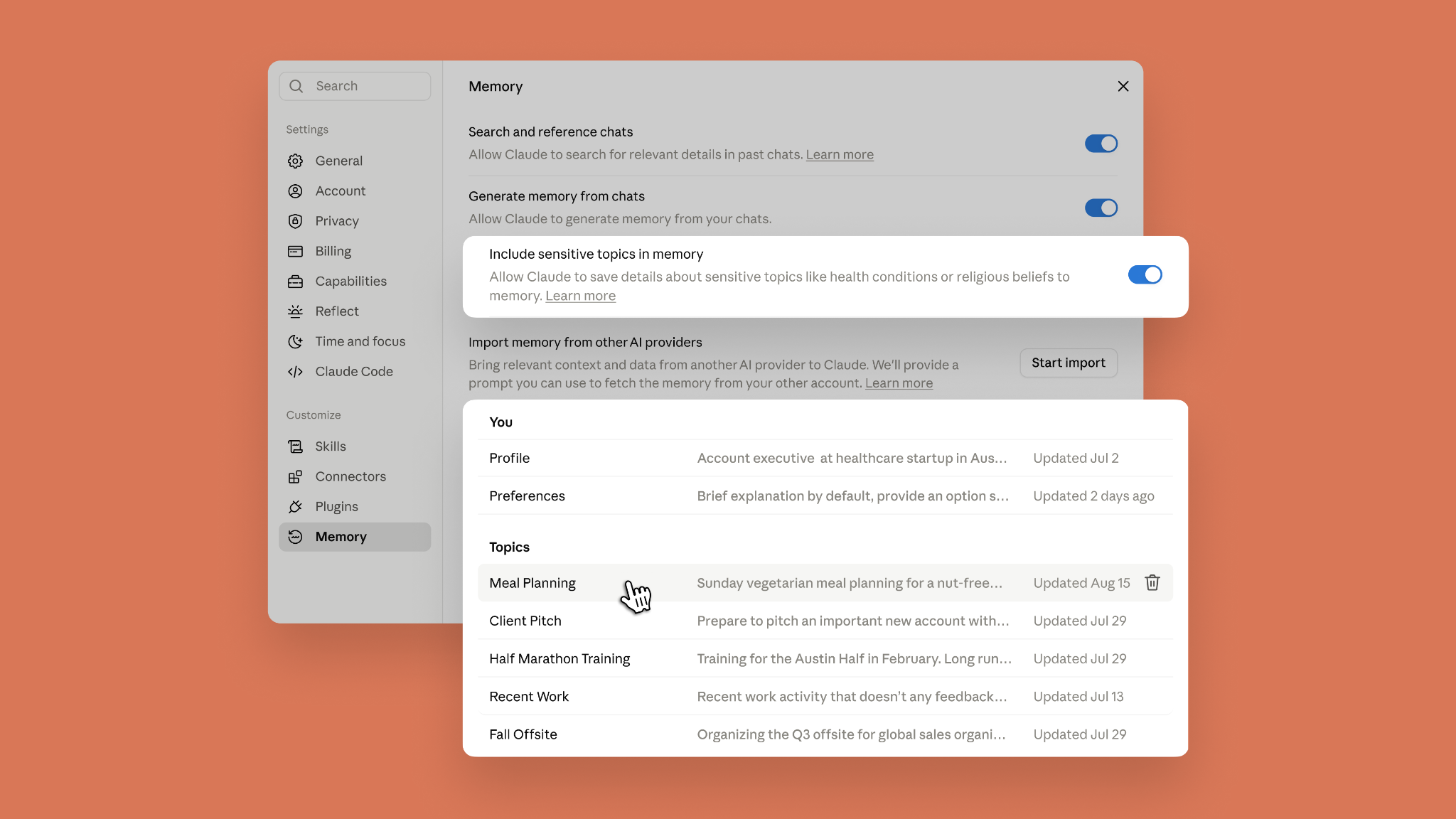
Alongside this, memory becomes a set of readable, editable, deletable files, all listed under Memory settings → Topics. Two things follow: first, memory is transparent to the user—you can see exactly how much context you've "fed" Claude, entry by entry; second, editing a memory entry takes effect globally—change the company's old name in one file, and every subsequent conversation and every Cowork task uses the new name.
The shift in write timing also brings a side effect: pause and reset now operate at a finer granularity. Anthropic offers two controls: pause memory writes at any time, and a one-click clear-all. Combined with the default "sensitive topics are not written" switch (categories like health, ethnicity, and religious beliefs are excluded from the memory pool by default), users get explicit control over what gets remembered and what doesn't.
Change one old name, and every conversation from then on gets it right
Memory isn't just a list—it's a set of individually editable files. Edit one entry, and Claude switches its tone across all scenarios simultaneously.
Anthropic structured memory as a Topics list in Settings, with each entry being a short, specific file. You're not tweaking a vague "user profile"—you're flipping through a dossier: something's wrong in an entry, open it, edit it, save it, and your very next sentence already reflects the change.
Anthropic's own words: correct your company's old name in one file and every conversation from then on gets it right—change one place, and all subsequent conversations update in sync.
This runs counter to most AI memory experiences. The common approach is to compress history into a "user profile" sentence stuffed into the system prompt—invisible and uneditable to the user; or to just restate context every turn. Claude breaks memory into named, short files, turning backend state into front-end editable text. Developers will recognize this approach—it's like a set of small Markdown documents, each with a topic, capable of diff (version comparison) and rollback.
The sync scope extends beyond chat. The original blog is explicit: chat and Cowork share the same memory. Q3 goals, boss preferences, and conference headcount mentioned in chat are used directly when Cowork takes on a writing task, and new facts discovered in Cowork flow back into chat. In other words, Cowork isn't "another Claude with its own memory"—it's another window into the same memory.
Pause and reset are also right there in Settings. Don't want it to remember, flip the switch; want a clean slate, hit reset. Anthropic made these operations the same granularity as "editing a single file," rather than burying "manage memory" three or four menu levels deep. This is the most understated yet decisive piece of the update for long-term usability: no matter how smart the AI, once memory becomes a black box, users walk away after the Nth time repeating themselves.
The sensitive-topics gate: closed tighter or opened wider?
Default-off doesn't mean unavailable—Anthropic hands the decision back to the user, while the hard wall against "never store things like SSNs" defines the product's minimum privacy floor.
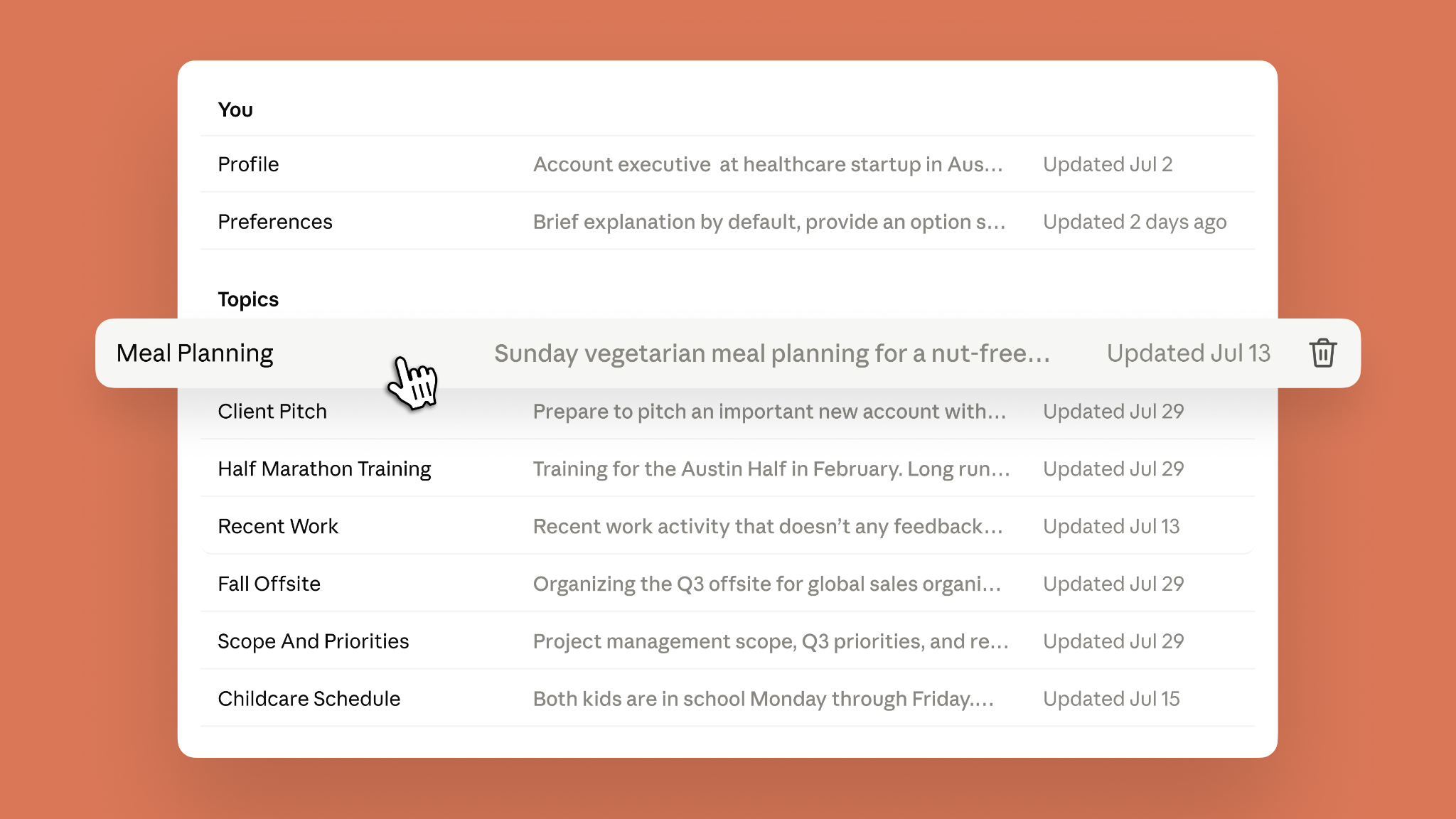
Health, race, religion, politics, gender identity—by default, these topics are not written into Claude's memory. The reasoning is straightforward: long-term storage of this kind of information, retrieved across contexts, creates leakage and misuse costs far beyond ordinary project data. Anthropic chose the most conservative starting point: better to make users re-explain a few times than to let the AI quietly remember things they never intended to share. But user scenarios vary. Someone who has Claude recommend recipes every week needs its gluten allergy remembered; someone managing a health journal needs drug contraindications persistently available. So Memory settings leaves a back door—the "include sensitive topics in memory" switch, off by default, that users can flip on themselves.
The hard wall is drawn around a different class of information—SSN, government ID numbers, criminal records, immigration status, and anything that violates the Acceptable Use Policy. Even with the sensitive-topics switch on, this data is never stored. The AI proactively tells you it can't save it. There's no user opt-in; it's a mandatory product-level constraint.
This product line points toward a longer-term judgment: the more complete an AI assistant's memory, the greater the value of cross-scenario recall—but the wider the privacy exposure. Anthropic's approach opens the "value side" to user configuration while locking the "risk side" into product code. Two signals are worth watching: first, whether the sensitive-topics switch expands to cover categories like financial details or home addresses; second, whether the frequency of the AI proactively flagging hard-wall-blocked information stays stable. If the AI ever quietly "can't forget" an SSN, that means the constraints are loosening. The SSN wall is the smallest unit for measuring this product line's privacy boundaries.
Save one entry first, then verify it in Cowork
The only thing to try right now is "mention something in chat → switch to Cowork and see if it picks it up." These two steps have clear paths in the primary source; everything else is observation territory for regular users.
The primary source says memory is on by default across Free, Pro, and Max. iOS and Android need to be updated to the latest version to get this capability. The switch for Team and Enterprise sits with administrators; individual users can't turn it themselves.
The fastest way to verify whether memory is connected: tell Claude something it couldn't possibly know, like "my manager is named Linda, and she prefers a three-part report format." Then switch to Cowork and ask it to draft an update for your boss—check whether the opening already follows Linda's style.
The primary source puts it this way: "Ask Cowork to draft an update for your manager, and it already knows who that is"—that's the official verification playbook.
To see what it's remembered about you, go to Memory settings → Topics, where entries are listed as files, each one readable, editable, deletable. The primary source emphasizes "a fix pays off everywhere": fix your company's old name in one memory entry, and all conversations after that get it right. Feel like it's remembering too much? Delete individual entries; want a clean slate? Hit reset.
Sensitive topics are not stored by default—health, race, religion, politics, gender identity, and the like. If you want Claude to remember your gluten allergy for recipe recommendations, you'll need to go into settings and turn on "include sensitive topics in memory."
Once enabled, you'll be notified each time a write happens, but it only covers new content—earlier conversations are not retroactively captured. Hard red lines like Social Security numbers, criminal records, and immigration status won't be stored even with the switch on; Claude will simply tell you it can't save them.
In chat, give Claude one specific piece of project context—Q3 priorities, or the name of who you report to
Open Cowork and have it draft a related document; check whether the opening already carries the details you just shared
Go to Memory settings → Topics, scan the auto-saved files, delete what you don't need, fix what's wrong
Decide whether to enable the "include sensitive topics in memory" switch; iOS and Android users should first confirm the app is updated
Team or Enterprise users should wait for the admin switch; confirm company approval before proceeding
Cowork's current status is "research preview, macOS only, under the Max plan"—if you're not on Max, adjust your expectations for the verification step: memory works platform-wide on the chat side, but the reverse-verification step in Cowork isn't accessible to most people yet. In that case, focus on getting read/write/delete working smoothly in chat first, and wait for official broader access.
Source: Claude Blog (Anthropic official blog, published August 25, 2026). Note: This article covers a vendor's own product announcement, describing the upgrade of Claude's memory to be shared across chat and Cowork. The stance leans toward product promotion; for specific scope, refer to the official Help Center.