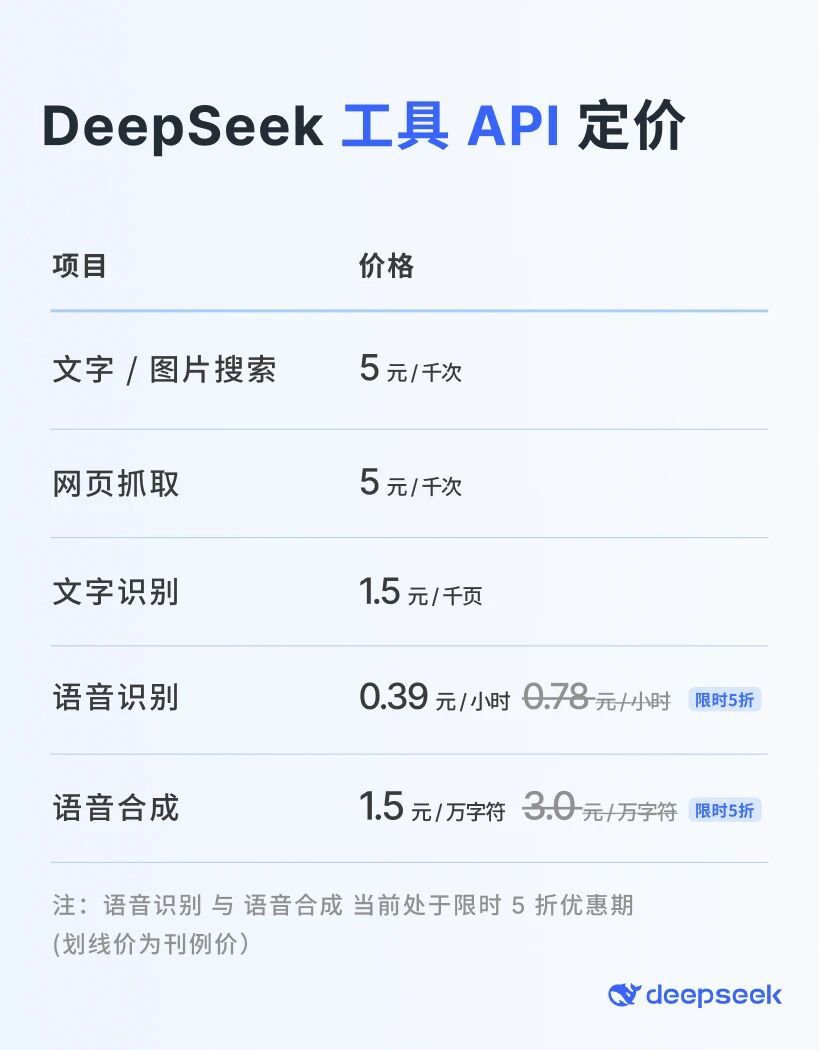
Developers once had to integrate separate search, document parsing, web scraping, and speech services to give chatbots the ability to browse the web, read PDFs, and interact through voice. DeepSeek has folded these capabilities into its existing API: enable the relevant parameters, and the model can use search, files, and links. Search, Fetch, OCR, ASR, and TTS can also be invoked independently. Tool calling has moved to the server side, but developers still need to verify search accuracy and whether benchmark results hold up.
Five Tool Interfaces Open
The focus of this release is not a new model, but the decomposition of external capabilities in chat products into callable interfaces. There are five standalone interface categories, and more than five capabilities are available during conversations.
These capabilities are powered by deepseek-flash(the name of DeepSeek’s current conversational model), which supports the Messages, Responses, and Chat Completions API formats. To research a topic, developers can add search; to process materials, they can provide files or links; and for voice interactions, they can connect the speech capabilities.
Search, Fetch, OCR, ASR, and TTS can each be used independently or together during a conversation.
Safety checks are also included. Once developers enable the safety-check parameter, the platform reviews the inputs received by the model and the outputs it generates. If the content is flagged as risky, the request returns a refusal indicator rather than a normal response. This mechanism sits within the model interaction chain and can be used during conversations or enabled independently by developers.
Who Now Owns the Middle Layer?
Search, file reading, and link reading are now available simply by enabling a parameter in the existing API.
For developers building chatbots and question-answering systems over knowledge bases, the changes involve request configuration. Once web search is enabled, the model in non-reasoning mode automatically searches the web or images based on the question and includes citations in its answer. File input and link reading follow the same server-side pipeline, eliminating the need for clients to manually organize scraped results and feed them back into the conversation.
The calling chain works somewhat differently in reasoning mode. Once the search tool is enabled, the model can search the web and read links autonomously during multi-step reasoning, without waiting for developers to prepare external materials in advance. It decides when to continue searching and how to incorporate the results into subsequent reasoning, while developers continue to use the existing API.
What developers no longer need to build is the custom toolchain. They still decide when to enable each capability and receive the results returned by the server, but they no longer need to determine how searches are triggered or how results enter the conversation context. DeepSeek’s update log is explicit about where this work now belongs: the server side.

How Are Files and Links Passed to the Model?
DeepSeek has taken over two stages of processing: converting files into text and turning web pages into context. Developers provide more than just an attachment or URL; the content is extracted or scraped first, then made available to the model for answering.
File input supports formats including PDF, Office documents, and images. The system first performs plain-text extraction and can also parse mixed text-and-image documents by processing textual and visual information together. The processed results are then inserted into the conversation context(the information the model can reference when generating an answer) for the model to use.
Links follow a different route. After enabling deepseek_read_url(the tool switch that lets the model read web links), the model automatically identifies links in user messages, scrapes their content, and answers using that content alongside the conversation context. Developers only need to provide the link, rather than scrape it themselves and convert it into a large block of text.
How Large Is the Search Index, and How Reliable Are Its Results?
DeepSeek’s web and API products share the same proprietary search foundation.
This foundation processes hundreds of millions of search requests from around the world every day, with an index covering hundreds of billions of web pages worldwide. API search uses the same high-traffic index with hundreds of billions of pages, rather than a separate experimental tool.
Search supports multiple languages and returns relevant, authoritative, and timely results in real time. Multilingual support determines whether it can process materials in different languages, while real-time retrieval affects whether newly published pages can appear in results. Relevance, authority, and timeliness together form the quality targets cited by DeepSeek, but they describe the retrieval mechanism rather than guarantee the correctness of every answer.
DeepSeek says it uses rigorous detection mechanisms to filter out SEO spam, GEO manipulation, and low-quality AIGC, reducing the likelihood that users and LLMs(large language models) will encounter manipulated or low-quality content.
The Toolchain Is in the API, but Compliance Is Still Developers’ Responsibility
By bringing search, files, links, and speech into the API, DeepSeek has reduced the toolchain developers must build, but not their responsibilities.
Safety checks are a mandatory part of integration. According to DeepSeek, once the safety-check parameter is enabled, the server reviews model inputs and outputs and returns a refusal indicator when risky content is detected. Developers must still use that indicator to handle interface feedback, logging, and user appeals; a single refusal cannot be treated as proof that the service has completed all required safety measures.
For externally facing services, DeepSeek explicitly requires the safety-check parameter to be enabled. The underlying capabilities provide risk assessments and refusal indicators, but developers remain responsible for content-safety review and must complete large-model registration and AI labeling as required. Search results come from the web, and files are uploaded by users, so checks before and after content enters the model cannot rely solely on the final answer.
DeepSeek has also built and open-sourced a demo client based on these APIs. It can import historical DeepSeek conversations for testing the integration. The demo client is only a reference implementation and cannot replace an integrator’s handling of real user content, refusal responses, or compliance-related disclosures.
The real-world latency, stability, and cost per task of these newly opened interfaces still need to be evaluated through actual use.
Sources: DeepSeek API Update Log; the information reflects official announcements. Model performance figures are vendor benchmarks with no third-party reproduction found; refer to the official documentation for pricing and specific usage instructions.