The common belief that “running a 70B large model requires professional-grade GPUs with dozens of GB of VRAM(the GPU's onboard memory, where the model's data sits while it runs)” has been shattered by an open-source tool. AirLLM enables a 70B model to run on a single 4GB consumer-grade GPU without quantization(lowering the model's precision to save resources, at some cost in quality) or distillation(a big model trains a smaller one, trading size for compactness). Even more astonishingly, the largest open-source model(model files made public for anyone to download and use) to date, the 28-trillion-parameter Kimi K3, only requires 3.72GB of VRAM to run with it. This project surged to the third spot on GitHub's trending list in early August.
4GB GPU Runs 70B, This Time It's Kimi K3 Making Waves
AirLLM isn't actually a new project; it has been iterating since the end of 2023. It gained attention because it added support for Kimi K3 in July 2026—a model with 28 trillion parameters, currently the largest open-source model. Official tests show that on an RTX 6000 Ada, the VRAM usage for running Kimi K3 stabilizes at 3.72GB.
The list of “running large models with low VRAM” it provides is quite straightforward: 70B Llama 3.x takes about 4GB, 405B Llama 3.1 about 8GB, 671B DeepSeek-V3 about 12GB, and 235B Qwen3 about 3GB. And these are all run at their original precision without relying on quantization, distillation, or pruning.
How It Works: Only One Layer in VRAM at a Time
To understand AirLLM, we need to correct an intuition: the VRAM required to run a large model does not depend on the total number of parameters in the model, but on how many parameters need to be loaded into VRAM at once. The traditional approach is to load the entire model into VRAM at once, so the larger the model, the more VRAM is needed. AirLLM, on the other hand, operates differently: during inference, only the weights of the current layer are retained in VRAM, and once computed, the next layer is loaded.
This way, the VRAM requirement depends only on “how large a single layer is,” not on “how large the entire model is.” No matter how large the model, it is processed one layer at a time, so a 4GB VRAM can run a 70B model.
For MoE(Mixture of Experts, where each word only passes through a few “expert” subnetworks, not all) models, it can be even more efficient: since each word is only routed to a few experts, AirLLM only loads the experts used by the current word, without touching the other hundreds. This is why the 28T Kimi K3 can be reduced to 3.72GB.
The Cost Is Real: It Is Slow
There's no such thing as a free lunch. AirLLM saves on VRAM at the expense of speed. Because each layer has to be moved from disk into VRAM for computation, the bottleneck is the disk I/O, so its inference(the process of the model computing an answer) latency is significantly higher than the approach of keeping the entire model in VRAM.
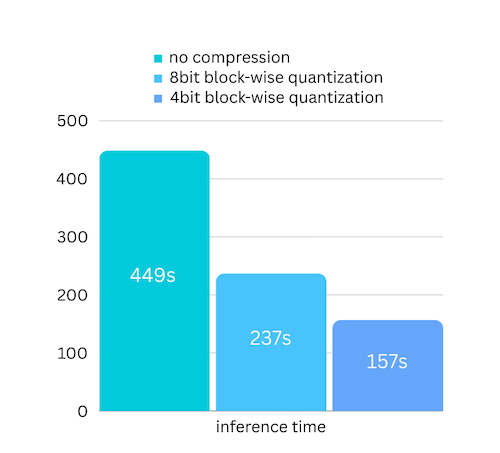
The official solution is to enable prefetching(preloading the next layer in advance to overlap data transfer and computation) to speed up by about 10%; using 4-bit compression can reduce the amount of data transferred each time, speeding up by about 3 times with almost no loss of accuracy. But even so, its design goal is “to run on extremely limited hardware,” not “to run fast.”
AirLLM solves the problem of “whether it can run,” not “how fast it can run.” For low-latency, high-concurrency real-time services, solutions like vLLM and llama.cpp should be used; AirLLM is suitable for scenarios where “I only have this much VRAM, but I just want to run a large model locally.”
Democratization of Large Models: What Does Breaking the Barrier Mean?
Taking a broader perspective. The real significance of tools like AirLLM is not in “saving VRAM” itself, but in lowering the hardware threshold for “running large models locally” from data center level to consumer level—a few thousand dollars for a GPU is enough to run a 70B model, or even a 2.8T model.
This brings two tangible changes. First, privacy: sensitive data no longer needs to be uploaded to third-party APIs; it can be inferred locally, which is a hard requirement for data-sensitive scenarios such as finance, healthcare, and legal services. Second, accessibility: individuals and small teams without GPU clusters can now access top-tier open-source models like Kimi K3 and DeepSeek-V3—they are no longer “visible but unattainable.”
Of course, we must be clear-headed: it is slow, it consumes disk space (initial layer splitting takes up a lot of space), and there are some configuration pitfalls (for example, Kimi K3 requires flash-attn, CUDA 12, and transformers 4.56.x). It is not a panacea, but it has pushed open the door to “whether it can run.”
Who Should Use It, How to Use It, and What to Watch Out For
If you only have a consumer-grade GPU with 4-8GB of VRAM and want to run a 70B or larger model, AirLLM is worth a try. Installation is just one line, and usage is almost the same as the regular transformers.
Installation: pip install airllm, then load with AutoModel.from_pretrained(model name) in one line; to change the model, just modify this line.
Disk Space: Initial run splits the model by layers and stores on disk, which takes up a lot of space; if you encounter MetadataIncompleteBuffer, it's likely due to insufficient disk space, so clear the cache and rerun.
To Speed Up: After installing bitsandbytes, add compression='4bit' for about 3 times speedup with minimal loss of accuracy.
Running Kimi K3: Note that you need to pip install compressed-tensors flash-attn, and use torch and transformers 4.56.x with CUDA 12.
The bottleneck of large model inference is not “how large the model is,” but “how many parameters are loaded into VRAM at once.” AirLLM uses “one layer at a time” to fit a 70B model into 4GB, at the cost of speed. If you want to run large models locally but are constrained by VRAM, try installing AirLLM today with pip install airllm; for fast real-time services, please use vLLM.
The data in this article comes from the official AirLLM GitHub documentation (primary source) and GitHub trending. VRAM usage is based on official/tested figures, which may vary depending on hardware and model. The parameters such as “70B” and “2.8T” in the text are model scale descriptors.